
Reflections
This week we were given the assignment brief for the year 2 FMP. Me and Brendan discussed what we both wanted to do and if we wanted to continue the axe project. The conclusion of that discussion was that I was going to continue the axe project where as he would start a new separate project. This week I also filled in the proposal document.
Next week I need to get a focus group together to discuss what I should focus on in the axe project now that its just me.
Week 1
W/C 24th February 2025
This week we were given the assignment brief for the year 2 FMP. Me and Brendan discussed what we both wanted to do and if we wanted to continue the axe project. The conclusion of that discussion was that I was going to continue the axe project where as he would start a new separate project. This week I also filled in the proposal document.
Next week I need to get a focus group together to discuss what I should focus on in the axe project now that its just me.
This week me and three friends discuss what I should focus on in the axe project. This was really helpful as it focused me and what was most important in the project and it also developed the idea further.
Also this week I wrote up a game analysis on the Tomb Raider Survivor Trilogy: Tomb Raider (2013), Rise of the Tomb Raider and Shadow of the Tomb Raider. This allowed me to look at what I enjoyed in those game and what I felt was needed. This developed my idea further and added new mechanics.
Week 2
W/C 3rd March 2025
This week me and three friends discuss what I should focus on in the axe project. This was really helpful as it focused me and what was most important in the project and it also developed the idea further.
Also this week I wrote up a game analysis on the Tomb Raider Survivor Trilogy: Tomb Raider (2013), Rise of the Tomb Raider and Shadow of the Tomb Raider. This allowed me to look at what I enjoyed in those game and what I felt was needed. This developed my idea further and added new mechanics.
This week I created my pitch slides and completed some secondary research. The secondary research helped me see a few things that I had over looked.
Also on the Sunday I started on production of my project. I didn’t start from a completely clean project, I just continued to use the unreal project from previous. So I already have smooth movement working from previous work. Though I did need to rework smooth rotation as what I had working was slow. Previously I was using the already included snap turn movement and just reducing the degree of snap but if I increased this number to speed up rotation the rotation became very snappy. So I looked back at previous project to see how rotation was handled there. I then copied over some of the code and messed with it a bit so it worked in this situation and got quick smooth rotation working. I also wrote the primary research of me looking back at previous work.
One thing that I want to change is how I handle the capsule that messes up the height. Currently I have the capsule set at 0 height so it doesn’t mess with the tracking origin but I want the capsule so I can have properly working collision.
While I try come up with some ideas for that I’m going to next work on getting the axe into the project, have you holding it and being able to holster it as well.
Week 3
W/C 10th March 2025
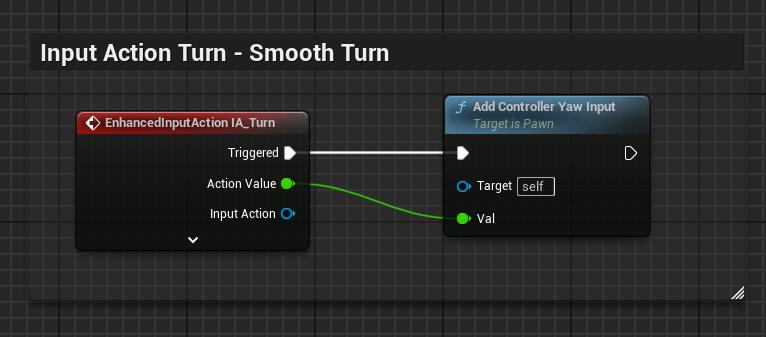
This week I created my pitch slides and completed some secondary research. The secondary research helped me see a few things that I had over looked.
Also on the Sunday I started on production of my project. I didn’t start from a completely clean project, I just continued to use the unreal project from previous. So I already have smooth movement working from previous work. Though I did need to rework smooth rotation as what I had working was slow. Previously I was using the already included snap turn movement and just reducing the degree of snap but if I increased this number to speed up rotation the rotation became very snappy. So I looked back at previous project to see how rotation was handled there. I then copied over some of the code and messed with it a bit so it worked in this situation and got quick smooth rotation working. I also wrote the primary research of me looking back at previous work.
One thing that I want to change is how I handle the capsule that messes up the height. Currently I have the capsule set at 0 height so it doesn’t mess with the tracking origin but I want the capsule so I can have properly working collision.
While I try come up with some ideas for that I’m going to next work on getting the axe into the project, have you holding it and being able to holster it as well.
Started working on the axe today. First I imported the model that Brendan made into my Unreal Engine project and messed around with the materials. I then created an actor blueprint and assigned the axe static mesh to it. I then added a grab component to and set that to snap. I then spent awhile aligning the grab component so that when you pick up the axe in the game it looks right in your hand. I also messed around with the physics and collision of the axe so that it works the way I want it to. I increased the weigh of the axe to 10,000kg so that when you drop it, it just lands and doesn’t move about but for some reason Unreal’s physics engine can’t do that because when I drop the axe it still bounces a bit even though it’s 10,000kg. Another weird thing with Unreal’s physics engine is when I throw the axe forwards it goes behind me. So when I mess around with getting axe throwing working I’ll need that to be fully animation and no reliance on physics. I also noticed that if you move off the centre point the rotation goes weird which is probably because the rotation is rotating the collision capsule rather then the headset camera. So I need to mess around with that some more as well.
What I need to do next is play Blade and Sorcery to see how the smooth movement and rotation work there to get a strong understanding on how it should work. I’ll then try to replicate that into Unreal Engine if possible. I will then start working on the axe again once I’m happy with the movement.
Wednesday 19th March 2025
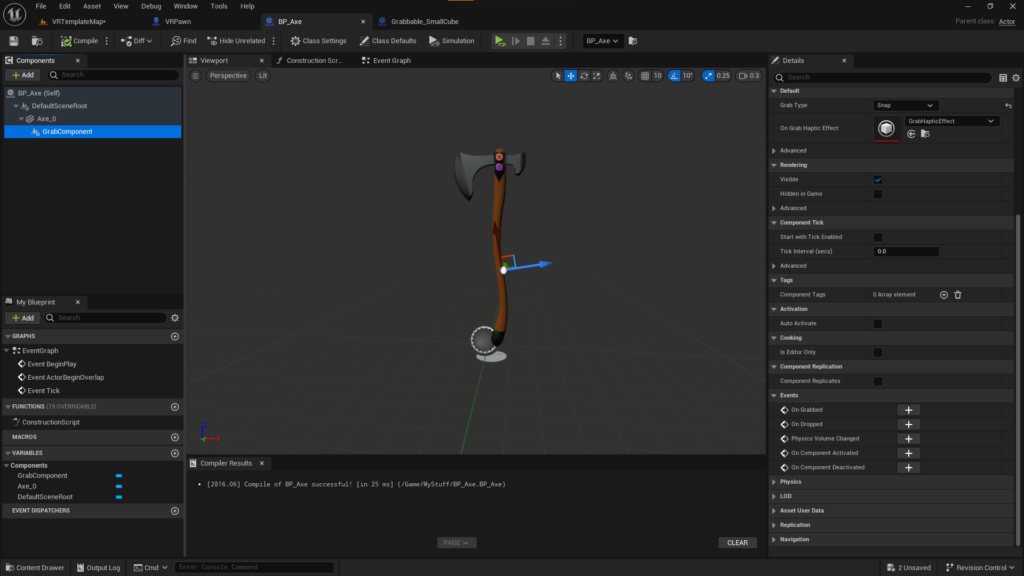
Started working on the axe today. First I imported the model that Brendan made into my Unreal Engine project and messed around with the materials. I then created an actor blueprint and assigned the axe static mesh to it. I then added a grab component to and set that to snap. I then spent awhile aligning the grab component so that when you pick up the axe in the game it looks right in your hand. I also messed around with the physics and collision of the axe so that it works the way I want it to. I increased the weigh of the axe to 10,000kg so that when you drop it, it just lands and doesn’t move about but for some reason Unreal’s physics engine can’t do that because when I drop the axe it still bounces a bit even though it’s 10,000kg. Another weird thing with Unreal’s physics engine is when I throw the axe forwards it goes behind me. So when I mess around with getting axe throwing working I’ll need that to be fully animation and no reliance on physics. I also noticed that if you move off the centre point the rotation goes weird which is probably because the rotation is rotating the collision capsule rather then the headset camera. So I need to mess around with that some more as well.
What I need to do next is play Blade and Sorcery to see how the smooth movement and rotation work there to get a strong understanding on how it should work. I’ll then try to replicate that into Unreal Engine if possible. I will then start working on the axe again once I’m happy with the movement.
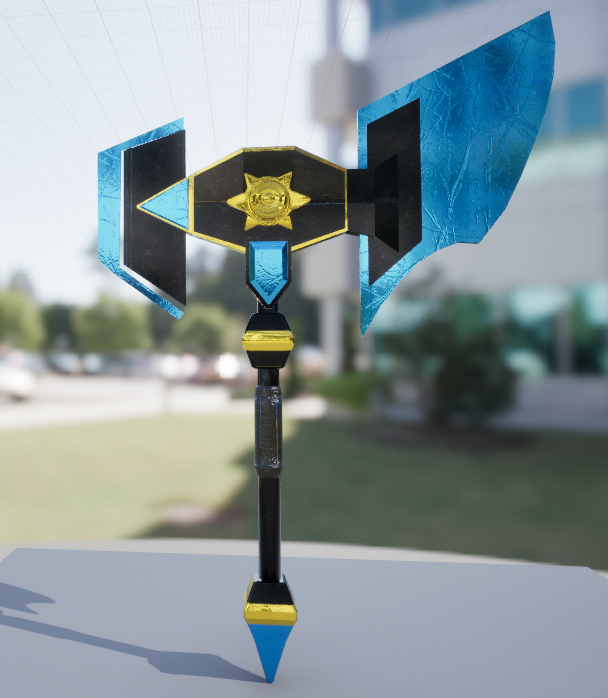
This week I spent working with Brendan to import an axe model he made into my project. He modelled the axe in Blender and also originally textured it in Blender as well. But we couldn’t get the texture from Blender to Unreal Engine. So we next tried using Substance Painter to texture it. We were able to import those textures into Unreal Engine but there was a problem. Because Brendan had previously textured the axe in Blender he had multiple materials linked to the axe with Substance Painter pick up on. This meant that when texturing and exporting the texture you would get several texture maps covering different bits of the axe. So Brendan went back into Blender removed the different materials, put it back into Substance Painter and retextured it. This meant that the axe only had one set of texture maps saving on space and making the game more efficient which is important as the game will be running standalone on a Meta Quest 3.
I have found a video that will help me create smooth locomotion in Unreal Engine for VR so next week I will follow that tutorial to hopefully create smooth locomotion with no problems. I will then work on throwing and recalling the axe.
Week 5
W/C 24th March 2025
(Model and texture not made by me)
This week I spent working with Brendan to import an axe model he made into my project. He modelled the axe in Blender and also originally textured it in Blender as well. But we couldn’t get the texture from Blender to Unreal Engine. So we next tried using Substance Painter to texture it. We were able to import those textures into Unreal Engine but there was a problem. Because Brendan had previously textured the axe in Blender he had multiple materials linked to the axe with Substance Painter pick up on. This meant that when texturing and exporting the texture you would get several texture maps covering different bits of the axe. So Brendan went back into Blender removed the different materials, put it back into Substance Painter and retextured it. This meant that the axe only had one set of texture maps saving on space and making the game more efficient which is important as the game will be running standalone on a Meta Quest 3.
I have found a video that will help me create smooth locomotion in Unreal Engine for VR so next week I will follow that tutorial to hopefully create smooth locomotion with no problems. I will then work on throwing and recalling the axe.
I followed the video tutorial on VR smooth locomotion. The video showed me how to get smooth movement, sprinting and jumping all working correctly within Unreal Engine without any of the problems I was previously having. The video didn’t show how to get smooth rotation working but using the systems the video put in place I was able to get smooth rotation working. I can now start working on throwing and recalling the axe.
Monday 31st March 2025
I followed the video tutorial on VR smooth locomotion. The video showed me how to get smooth movement, sprinting and jumping all working correctly within Unreal Engine without any of the problems I was previously having. The video didn’t show how to get smooth rotation working but using the systems the video put in place I was able to get smooth rotation working. I can now start working on throwing and recalling the axe.
For this week (It’s Thursday as I’m writing this) I have been attempting to get recalling or throwing working. First I was going to tackle recalling as it would be helpful to have that sorted out when I start doing throwing. My first idea was to use a spline that the axe would travel across but my problem was that I wanted the axe to come to you no matter where you were, as long as there was a path and it didn’t go through any walls. So I need something more complicated as I couldn’t find or think of anything that would allow me to create a spline path that would adhere to those rules. I then thought about using AI as it has a built in pathing system but I didn’t want to make my axe into an AI as it might cause problems later. I decided to start trying to find any tutorials people might have made and found this video. This video is good but it’s for a flat screen 3rd person game which means it can get away with things that I can’t making a first person VR game. In this video the axe goes towards the player while the players movement is disabled, the axe ‘hits’ the player, is destroyed and a different axe is put in the players hand. This showed me a problem I had which was that the player could move where their hand was and the axe pathing had to adapt to that so the axe always went to the hand. So I decided to leave recalling for now and work on throwing while I tried to think of another plan. I started to work on throwing because I thought it would be easier and it might help come up with some ideas. For the throwing I wanted to create a targeting system to help with throwing at important things like Arkham Shadow has for the Batarangs. I was going to have a targeting reticle like Arkham Shadow but I thought it would be annoying to have that on screen all the time when you’re holding the axe and I didn’t want a button to start enabling targeting. I found this Reddit post about how someone had created a system basically exactly how I wanted it. In the comments he went over the rough steps of how he achieved this. So I got to work first things first I needed to recognise that the axe was being thrown. So I modified the release mechanic to check if it was the axe being released and check if the motion controllers velocity was high enough to count as a throw. Easy I thought I’ve done something similar before. In Fish Saber when the fish would get hit I would check the velocity of the motion controller to see if you had hit it and not just held your controller in the right place. So I replicated this code into my new project and it doesn’t work. For some reason I no longer can get velocity. The video attached to this long reflection shows me in both Fish Saber and the axe project. In Fish Saber I get a velocity in the axe project I don’t. There are 4 differences I can think of between these two projects. Fish Saber is in an older version of Unreal, Fish Saber doesn’t have the Meta XR plugin, Fish Saber is accessing velocity from outside the player blueprint and Fish Saber player is a Pawn not a Character. I don’t know which one if any are causing the problem but I need to come up with a work around because most these 4 things are either difficult to test or I can’t change. Tomorrow I will test accessing the velocity from outside the player blueprint and some work arounds.
First Half of Week 7
W/C 7th April 2025
For this week (It’s Thursday as I’m writing this) I have been attempting to get recalling or throwing working. First I was going to tackle recalling as it would be helpful to have that sorted out when I start doing throwing. My first idea was to use a spline that the axe would travel across but my problem was that I wanted the axe to come to you no matter where you were, as long as there was a path and it didn’t go through any walls. So I need something more complicated as I couldn’t find or think of anything that would allow me to create a spline path that would adhere to those rules. I then thought about using AI as it has a built in pathing system but I didn’t want to make my axe into an AI as it might cause problems later. I decided to start trying to find any tutorials people might have made and found this video. This video is good but it’s for a flat screen 3rd person game which means it can get away with things that I can’t making a first person VR game. In this video the axe goes towards the player while the players movement is disabled, the axe ‘hits’ the player, is destroyed and a different axe is put in the players hand. This showed me a problem I had which was that the player could move where their hand was and the axe pathing had to adapt to that so the axe always went to the hand. So I decided to leave recalling for now and work on throwing while I tried to think of another plan. I started to work on throwing because I thought it would be easier and it might help come up with some ideas. For the throwing I wanted to create a targeting system to help with throwing at important things like Arkham Shadow has for the Batarangs. I was going to have a targeting reticle like Arkham Shadow but I thought it would be annoying to have that on screen all the time when you’re holding the axe and I didn’t want a button to start enabling targeting. I found this Reddit post about how someone had created a system basically exactly how I wanted it. In the comments he went over the rough steps of how he achieved this. So I got to work first things first I needed to recognise that the axe was being thrown. So I modified the release mechanic to check if it was the axe being released and check if the motion controllers velocity was high enough to count as a throw. Easy I thought I’ve done something similar before. In Fish Saber when the fish would get hit I would check the velocity of the motion controller to see if you had hit it and not just held your controller in the right place. So I replicated this code into my new project and it doesn’t work. For some reason I no longer can get velocity. The video attached to this long reflection shows me in both Fish Saber and the axe project. In Fish Saber I get a velocity in the axe project I don’t. There are 4 differences I can think of between these two projects. Fish Saber is in an older version of Unreal, Fish Saber doesn’t have the Meta XR plugin, Fish Saber is accessing velocity from outside the player blueprint and Fish Saber player is a Pawn not a Character. I don’t know which one if any are causing the problem but I need to come up with a work around because most these 4 things are either difficult to test or I can’t change. Tomorrow I will test accessing the velocity from outside the player blueprint and some work arounds.
So I tried getting motion controller velocity from outside the player blueprint but that also didn’t work. So next I decided to try grab the axe’s velocity. First, I gave the axe a projectile movement component so I could grab its velocity. But for some reason when the axe is thrown and the velocity is grabbed it thinks that the velocity is straight down mostly. This means I can’t get the direction that the axe was thrown which means I can’t create the trace that will find all the auto aim objects in the direction of the throw. I don’t know what to do at this point. I could grab the location of the axe wait a frame and grab the location again and work out everything from there but that’s really stupid. I should be able to grab the velocity and have the speed and direction of travel of the axe.
Sunday 13th April 2025
So I tried getting motion controller velocity from outside the player blueprint but that also didn’t work. So next I decided to try grab the axe’s velocity. First, I gave the axe a projectile movement component so I could grab its velocity. But for some reason when the axe is thrown and the velocity is grabbed it thinks that the velocity is straight down mostly. This means I can’t get the direction that the axe was thrown which means I can’t create the trace that will find all the auto aim objects in the direction of the throw. I don’t know what to do at this point. I could grab the location of the axe wait a frame and grab the location again and work out everything from there but that’s really stupid. I should be able to grab the velocity and have the speed and direction of travel of the axe.
What I first tried today was to grab the location of the axe wait a frame and then grab the location again and work stuff out from there. Problem being though that the locations were wrong. I then removed the projectile movement component which seemed to fix the locations but not fully. Now the problem I had was that the location was the same with both times that I grabbed it. Even if I wanted a full second between the two locations. My solution to that was to reference the static mesh of the axe and grab its world location that seemed to work. I then fiddled with the sphere trace to make sure it was in the right place and was sized big enough. Then my next problem. Suggest Projectile Velocity keeps failing. I can’t tell if I’m using the node wrong or if its just not working for some mysterious reason like everything else.
Also I set up buttons to allow you to change between powers ready for when I get round to that. If get throwing and recalling working.
I feel like completely restarting the project is my next step because it feels like something is really wrong with this UE5 project. Not being able to get motion controller velocity, projectile movement seemingly messing around with velocity and location as well getting an actors location not working correctly. Also I’ve discovered a strange bug where using the restart system, built by Unreal Engine, seems to break the physics and collision for a bit as shown in the video attached.
It’s currently Easter Break so I’m going to wait until I’m back in college then I’ll talk to my tutor, Calum, to see if he has any ideas before I restart the project.
I have a theory why actor location wasn’t working. I think it’s cause when you pick up the axe the default scene root wouldn’t follow so the actor location wouldn’t change. I think I’ve fixed this by changing the scene root to the static mesh of the axe. I haven’t tested this yet but I made the changes.
Monday 14th April 2025
What I first tried today was to grab the location of the axe wait a frame and then grab the location again and work stuff out from there. Problem being though that the locations were wrong. I then removed the projectile movement component which seemed to fix the locations but not fully. Now the problem I had was that the location was the same with both times that I grabbed it. Even if I wanted a full second between the two locations. My solution to that was to reference the static mesh of the axe and grab its world location that seemed to work. I then fiddled with the sphere trace to make sure it was in the right place and was sized big enough. Then my next problem. Suggest Projectile Velocity keeps failing. I can’t tell if I’m using the node wrong or if its just not working for some mysterious reason like everything else.
Also I set up buttons to allow you to change between powers ready for when I get round to that. If get throwing and recalling working.
I feel like completely restarting the project is my next step because it feels like something is really wrong with this UE5 project. Not being able to get motion controller velocity, projectile movement seemingly messing around with velocity and location as well getting an actors location not working correctly. Also I’ve discovered a strange bug where using the restart system, built by Unreal Engine, seems to break the physics and collision for a bit as shown in the video attached.
It’s currently Easter Break so I’m going to wait until I’m back in college then I’ll talk to my tutor, Calum, to see if he has any ideas before I restart the project.
I have a theory why actor location wasn’t working. I think it’s cause when you pick up the axe the default scene root wouldn’t follow so the actor location wouldn’t change. I think I’ve fixed this by changing the scene root to the static mesh of the axe. I haven’t tested this yet but I made the changes.
Thanks to this UE Forum post I was able to get the Suggest Projectile Velocity to return true and plus that into the impulse and have my axe throw accurately. It seems so obvious now to just turn up launch speed but I had seen 5-6 other Reddit posts or UE Forum post that had people with working code have launch speed set to like 200-300 no where near the 4500 I’ve had to set it to. What I was talking about in my previous reflection with the scene root worked. Actor location now works with the static mesh being the top parent. The bug with the physics not working is not limited to the restart sometimes when you start the project that physics don’t work in the same way as I was describing previously. Next thing I need to work on is having the axe stick in things when it hits. Then hopefully recalling or maybe just powers.
Saturday 19th April 2025
Thanks to this UE Forum post I was able to get the Suggest Projectile Velocity to return true and plus that into the impulse and have my axe throw accurately. It seems so obvious now to just turn up launch speed but I had seen 5-6 other Reddit posts or UE Forum post that had people with working code have launch speed set to like 200-300 no where near the 4500 I’ve had to set it to. What I was talking about in my previous reflection with the scene root worked. Actor location now works with the static mesh being the top parent. The bug with the physics not working is not limited to the restart sometimes when you start the project that physics don’t work in the same way as I was describing previously. Next thing I need to work on is having the axe stick in things when it hits. Then hopefully recalling or maybe just powers.
For the past couple weeks I have been sorting out my website getting research and reflections presented on there. As I only have like 2 weeks left of the project I wanted to sort out some sort of visual indicator of which power was activated as I had added the code to change between powers.
The problem I had was that the axe had one texture map and I wanted to change the colour of part of the axe. What I did was put the base colour texture map into GIMP and use hue and saturation to change the blue to different colours. I then created material instances and coded in the changing material. This gave the axe a visual indicator of which power was active.
Tuesday 6th May 2025
For the past couple weeks I have been sorting out my website getting research and reflections presented on there. As I only have like 2 weeks left of the project I wanted to sort out some sort of visual indicator of which power was activated as I had added the code to change between powers.
The problem I had was that the axe had one texture map and I wanted to change the colour of part of the axe. What I did was put the base colour texture map into GIMP and use hue and saturation to change the blue to different colours. I then created material instances and coded in the changing material. This gave the axe a visual indicator of which power was active.