
Reflections
This week we were introduced to the task. I’m planning to choose the brief where you need to create VR game mechanics for an adventure game. I had a look at a plugin for Unreal Engine made by Meta which allows for hand tracking. I haven’t been able to test it or play around with it yet as the college computers don’t have the drivers installed for VR. Waiting on the IT team to get the time to install the drivers. I’ve also been having a quick look over other VR adventure games and other VR games with hand tracking to try get ideas for what I want to create. So far all I have is that I want to include hand tracking. Which causes a problem for movement as you don’t have joysticks for smooth movement so I need to choose between teleporting, arm swinging movement or no movement at all.
Week 1
WC 9th September 2024
This week we were introduced to the task. I’m planning to choose the brief where you need to create VR game mechanics for an adventure game. I had a look at a plugin for Unreal Engine made by Meta which allows for hand tracking. I haven’t been able to test it or play around with it yet as the college computers don’t have the drivers installed for VR. Waiting on the IT team to get the time to install the drivers. I’ve also been having a quick look over other VR adventure games and other VR games with hand tracking to try get ideas for what I want to create. So far all I have is that I want to include hand tracking. Which causes a problem for movement as you don’t have joysticks for smooth movement so I need to choose between teleporting, arm swinging movement or no movement at all.
This week we looked at some audio mixing in audition. I had a look at Elite Dangerous’ VR. I had a look at what I liked about its VR, what worked and what I could implement into my VR game. We went to Chichester University to experience the university and the game design course.
Week 2
WC 16th September 2024
This week we looked at some audio mixing in audition. I had a look at Elite Dangerous’ VR. I had a look at what I liked about its VR, what worked and what I could implement into my VR game. We went to Chichester University to experience the university and the game design course.
I teamed up with Brendan to make a project together. He’s going to make the 3D models and I’m going to do the programming. Me and Brendan also worked out how to export from Blender to substance paint to then unreal engine. This week we also did some music composition in audition. I got the Meta XR plugin working with my personal computer just need to sort out getting it working at college.
Week 3
WC 23rd September 2024
I teamed up with Brendan to make a project together. He’s going to make the 3D models and I’m going to do the programming. Me and Brendan also worked out how to export from Blender to substance paint to then unreal engine. This week we also did some music composition in audition. I got the Meta XR plugin working with my personal computer just need to sort out getting it working at college.
I got hand tracking working in Unreal Engine with the Meta XR plugin.
Week 5
WC 7th October 2024
I got hand tracking working in Unreal Engine with the Meta XR plugin.
I have changed the platform from PCVR to Meta’s Horizon OS platform to make a standalone game. This change has came about due to the college computers not being able to run VR. Making a standalone game will allow me to bring the game into college for testing and demonstration.
Week 6
WC 14th October 2024
I have changed the platform from PCVR to Meta’s Horizon OS platform to make a standalone game. This change has came about due to the college computers not being able to run VR. Making a standalone game will allow me to bring the game into college for testing and demonstration.
I have ran through the quick set up guide for making games in Unreal Engine for Horizon OS which included: downloading and building a forked version of Unreal Engine 5.4.3 that is developed by Meta for VR development, downloading and installing the require Android Studio for building and deploying VR applications for Horizon OS, starting a new Unreal Engine project and configuring the Meta XR plugin. I have also installed a separate application call Meta Quest Development Hub which is used to manage your device, debug your applications and install your program onto your headset.
Week 8
WC 28th October 2024
I have ran through the quick set up guide for making games in Unreal Engine for Horizon OS which included: downloading and building a forked version of Unreal Engine 5.4.3 that is developed by Meta for VR development, downloading and installing the require Android Studio for building and deploying VR applications for Horizon OS, starting a new Unreal Engine project and configuring the Meta XR plugin. I have also installed a separate application call Meta Quest Development Hub which is used to manage your device, debug your applications and install your program onto your headset.
I have built an APK of an Unreal Engine project, install it onto my headset and run the program standalone on the headset. Now that I have this proof of concept working I can start development of my game.
Week 9
WC 4th November 2024
I have built an APK of an Unreal Engine project, install it onto my headset and run the program standalone on the headset. Now that I have this proof of concept working I can start development of my game.
After struggling to get hand tracking to work correctly in Meta’s forked version of Unreal Engine I have decided to go back to base Unreal Engine 5.4.4 with the Meta XR plugin. I will create a project, get hand tracking working and try export an APK to run on my Quest 3.
The problem I was having with hand tracking was the hand models placement and rotation. Both hands were rotated wrong and either too high or too low. I couldn’t find a fix for this problem other than manually adjusting the positions of the models which I don’t want to do as this could cause problems later.
19th November 2024
After struggling to get hand tracking to work correctly in Meta’s forked version of Unreal Engine I have decided to go back to base Unreal Engine 5.4.4 with the Meta XR plugin. I will create a project, get hand tracking working and try export an APK to run on my Quest 3.
The problem I was having with hand tracking was the hand models placement and rotation. Both hands were rotated wrong and either too high or too low. I couldn’t find a fix for this problem other than manually adjusting the positions of the models which I don’t want to do as this could cause problems later.
I made a VR project in Unreal Engine 5.4.4 with the Meta XR plugin, got hand tracking working and exported an APK. I installed the APK onto my headset and the program worked with hand tracking. I can now start working on getting the mechanics working.
20th November 2024
I made a VR project in Unreal Engine 5.4.4 with the Meta XR plugin, got hand tracking working and exported an APK. I installed the APK onto my headset and the program worked with hand tracking. I can now start working on getting the mechanics working.
The Meta XR plugin only comes with 8 input events for hand tracking, pinch for each finger. To add custom hand tracking input events you need Oculus Hand Tools plugin. To get the plugin you need to download a sample project and transfer the plugin from that project to yours. I have trouble getting the plugin to work with my project it has either cause my project to corrupt or it won’t recognise the plugin. I have a feeling it might be because the plugin project is Unreal Engine 5.4.3 where as my project is 5.4.4 which I think is causing the problem. I have a couple idea of how to fix/get round this problem.
25th November 2024
The Meta XR plugin only comes with 8 input events for hand tracking, pinch for each finger. To add custom hand tracking input events you need Oculus Hand Tools plugin. To get the plugin you need to download a sample project and transfer the plugin from that project to yours. I have trouble getting the plugin to work with my project it has either cause my project to corrupt or it won’t recognise the plugin. I have a feeling it might be because the plugin project is Unreal Engine 5.4.3 where as my project is 5.4.4 which I think is causing the problem. I have a couple idea of how to fix/get round this problem.
After more attempts at getting the Oculus Hand Tools plugin working I have successfully installed the plugin into my project. I now need to start working on understanding how it works and getting it to work with my project.
6th December 2024
After more attempts at getting the Oculus Hand Tools plugin working I have successfully installed the plugin into my project. I now need to start working on understanding how it works and getting it to work with my project.
I’m ditching hand tracking. To be able to add custom hand tracking inputs I need to use a plugin called Oculus Hand Tools which you can only get by taking it out of a test project from GitHub. The problem is that the plugin isn’t working with my project. I thought I had got it working but when I loaded the project again I got the same error message that I had been getting before.
I have also came to the conclusion that I don’t think hand tracking will work in the game I want to create. The key problem is the movement. I want the primary movement method to be smooth movement but I haven’t been able to think of a method of having smooth movement with hand tracking. So I don’t want to waste more time on getting hand tracking to work when I don’t believe it can work in my project.
13th December 2024
I’m ditching hand tracking. To be able to add custom hand tracking inputs I need to use a plugin called Oculus Hand Tools which you can only get by taking it out of a test project from GitHub. The problem is that the plugin isn’t working with my project. I thought I had got it working but when I loaded the project again I got the same error message that I had been getting before.
I have also came to the conclusion that I don’t think hand tracking will work in the game I want to create. The key problem is the movement. I want the primary movement method to be smooth movement but I haven’t been able to think of a method of having smooth movement with hand tracking. So I don’t want to waste more time on getting hand tracking to work when I don’t believe it can work in my project.
Started working on getting smooth movement working in VR. I’ve discovered that I need to remake the rotation controls as well as it’s snap rotate rather than smooth rotate. I have also figured out two ways to get smooth movement working which both have problems to solve.
1) The first way I got smooth movement working is using the VR blueprint that is already in the VR project and adding a floating pawn movement component to it. The problem is that it doesn’t have gravity so it floats everywhere.
2) Method two was to create a character pawn which comes with the character movement component which does have gravity. The problem here is that when I copied everything over from the base pawn into this new one everything becomes a child of the collision capsule which messes up the set tracking origin function as location is now based around the capsule and not the world. This results in the player being very tall. If I set location for the VR origin to be related to the world then the player doesn’t move as the movement effects the capsule.
17th December 2024
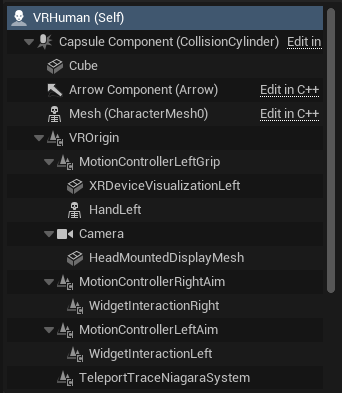
Started working on getting smooth movement working in VR. I’ve discovered that I need to remake the rotation controls as well as it’s snap rotate rather than smooth rotate. I have also figured out two ways to get smooth movement working which both have problems to solve.
1) The first way I got smooth movement working is using the VR blueprint that is already in the VR project and adding a floating pawn movement component to it. The problem is that it doesn’t have gravity so it floats everywhere.
2) Method two was to create a character pawn which comes with the character movement component which does have gravity. The problem here is that when I copied everything over from the base pawn into this new one everything becomes a child of the collision capsule which messes up the set tracking origin function as location is now based around the capsule and not the world. This results in the player being very tall. If I set location for the VR origin to be related to the world then the player doesn’t move as the movement effects the capsule.
Solved smooth movement for method 2 (as stated above). It was painfully simple and I’m disappointed I didn’t think of this sooner. I made the collision capsule’s height 0 so it doesn’t mess up the VR origin.
I need to sort out smooth rotation plus sometimes you can walk through objects. Need to come up with a way to have a dynamic hit box.
25th January 2025
Solved smooth movement for method 2 (as stated above). It was painfully simple and I’m disappointed I didn’t think of this sooner. I made the collision capsule’s height 0 so it doesn’t mess up the VR origin.
I need to sort out smooth rotation plus sometimes you can walk through objects. Need to come up with a way to have a dynamic hit box.
Smooth rotation added plus fixed a bug with smooth movement not going in the direction you’re looking.
27th January 2025
Smooth rotation added plus fixed a bug with smooth movement not going in the direction you’re looking.