
Research
Focus Group – 3 People
The main movement method will be some sort of smooth movement but we will have an option for teleporting for people who don’t like smooth movement. We’ll have an axe that has different abilities. You will be able to throw and recall the axe, freeze things with the axe to stop things from moving, fire ability to burn things that are blocking your path like vines, earth to make platforms or walls to defend yourself and wind to blow things. Doors will be swing one way and will have a door handle mechanic to open them. Teleport between levels. The hub world will allow you to access the puzzle worlds but will also act like a tutorial world.
Game Analysis – VR Movement – Various Games
Wallace & Gromit in The Grand Getaway, Neko Atsume Purrfect Kitty Collector, Pistol Whip & UNDERDOGS
Grand Getaway and Neko Atsume can be played both with controllers and hand tracking for the analysis I looked at hand tracking as that is what I want in my game. The way Grand Getaway handles movement within their game is with specific spots that the play can teleport to this allows the developer controller where the player can be and makes it easier for the developer to manage what the player can do and see. This works with Grand Getaway as its a short story based game with minigames interjected throughout to provide the gameplay. With this limited movement it allows the developer to more easily guide the player through the experience of the game. This makes it easier for player who aren’t too common with games which would be an expected audience for a VR game based in the world of Wallace & Gromit a British stop-motion animated comedy from the late 1980s. Neko Atsume handles movement very similarly with having set spots that the player can teleport to but I don’t think it works as well in Neko Atsume. Neko Atsume is a mobile game adapted into VR where you decorate you house with various cat toys and beds to attract and collect cats. With Neko Atsume I found myself wanting to walk up to the cats but I couldn’t I could only teleport to set spots on the ground. You can have the cats walk up to you but you can only have one are a time and you can’t seem to pick which one comes to you. Grand Getaway and Neko Atsume also go about the action of teleporting in different ways. Grand Getaway has you hold up your hands in front of your face in a circle and look through it which felt weird to do where as Neko Atsume has you simply point to the spot you want to teleport to which felt more comfortable. Though I did find the Grand Getaway teleporting more reliable where as Neko Atsume often struggled to notice I was point and trying to teleport.
Pistol Whip handles movement in a very simple way. You can’t move instead you are stuck on rails and are rolled across the track at a set pace as the level plays out. This works really well for Pistol Whip which is a rhythm game where you have to clear levels by shooting enemies to the beat. But for what I want to make I don’t think it will work.
UNDERDOGS is played with controllers though its movement could be implemented into hand tracking. UNDERDOGS has a very interesting movement system where you grab onto the ground and drag your character across the ground to move. For spinning you can either use the joy stick or you can just turn around in real life which is what the game encourages you to do. Though that does make the movement easier and feel more fluid it does require you to have a big room where you can’t break things. The movement works very well for UNDERDOGS but I don’t think it would work in my game.
Installing Meta XR Plugin for Unreal Engine – Tutorial – YouTube
This video helped me set up the Meta XR plugin for Unreal Engine. The Meta XR plugin will allow me to use the hand tracking features of Meta Quest headsets in my game development. The video is out of date a bit. How you download and install the plugin is different but everything past that was still relevant and helpful. He has other videos on how to use the Meta XR plugin which I will probably watch to understand the basics of how the plugin works.
Getting hand tracking working with Unreal Engine & Meta XR Plugin – Tutorial – YouTube
This video helped me to use the Meta XR plugin to get hand tracking working in an Unreal Engine project. It helped me to get Unreal to start recognising my hands as the game controller and to fix a couple bugs that pop up when you change the basic VR pawn from controller controls to hand tracking. As well it showed me how to create a basic material for the hands. The video was a bit confusing at one point but apart from that it was perfect. It was up to date and on the current version of Unreal Engine which was helpful.

Setting up a dev environment to start developing VR games for Horizon OS – Quick Start Guide – Meta Website
This guide was very helpful it helped me set up number of things that will allow me to develop VR games for standalone Quest. The things it helped me do are:
- Create a Meta developer account
- Link and create Epic Games and GitHub accounts
- Install a forked version of Unreal Engine from GitHub and build it
- Download and install the correct version of Android Studio and Android NDK
- Change my Quest headset into developer mode
- Download, install and set up the Meta Quest Developer Hub
- Create a VR project in Unreal Engine
- Set up the Meta XR plugin
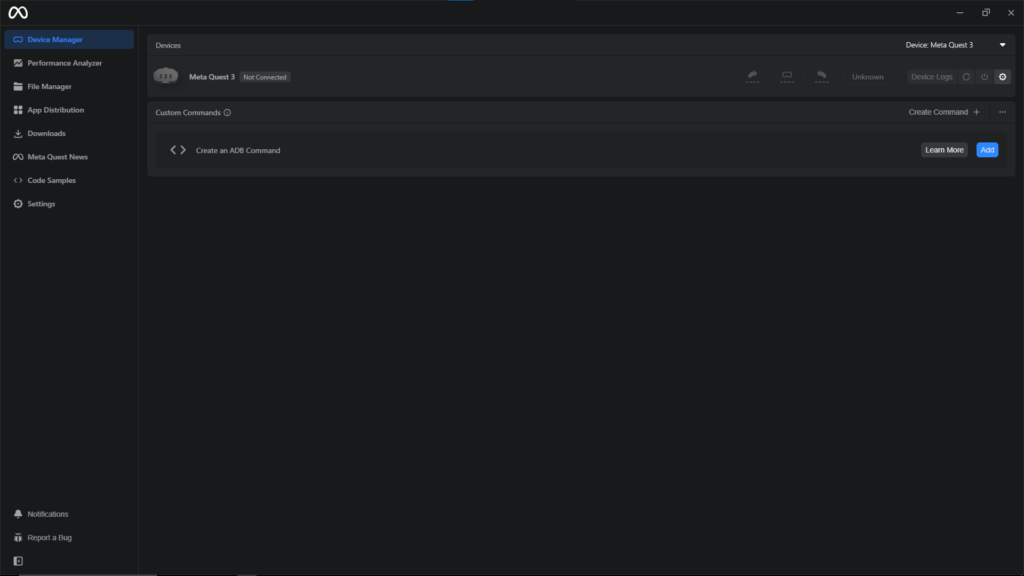
Packaging and testing using the Meta Quest Developer Hub – Guide – Meta Website
This guide helped me with packaging and testing my VR game on my headset. It taught me how to get my VR game onto my Quest headset for testing without needing to publish the application onto the Meta Quest store. This will allow me to make sure the game can run on standalone but also allow me to bring my project into college for demonstrating and presenting.